
Mapping Data
How mappings align each source system with the canonical model, set the direction of flow, and use AI suggestions you review and accept.
See this on the STRAX product page →
What a mapping is
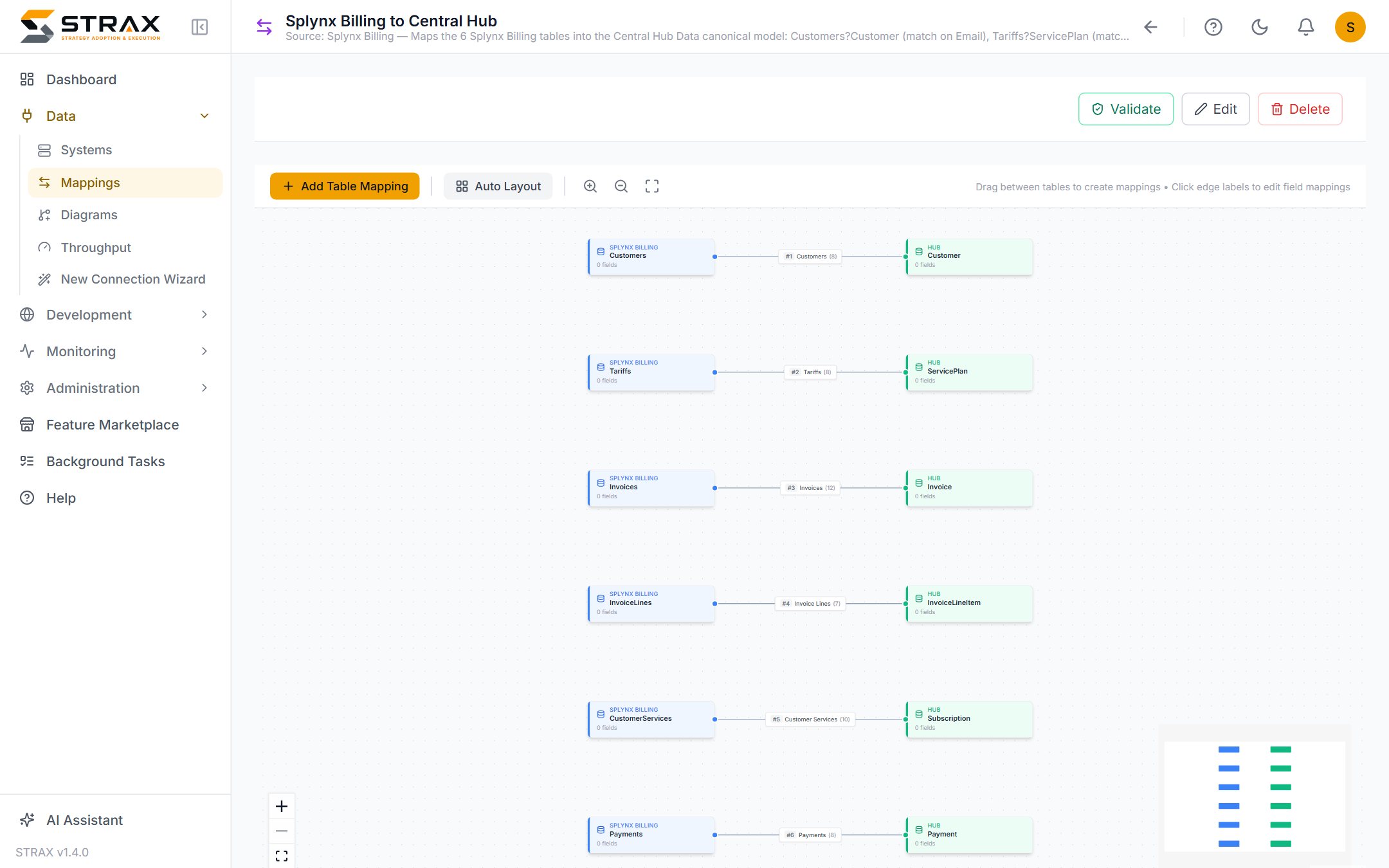
A mapping records how one connected system relates to the canonical model. It pairs the system's tables with the hub's tables, and within each pair it aligns the individual fields. When Demo ISP maps Splynx, the Splynx subscriber table pairs with the hub's Customer table, and the subscriber's name, email and status fields align with their canonical counterparts.
A mapping is a description, not a program. You state what corresponds to what, and STRAX generates and maintains everything needed to move the data. When the mapping changes, the generated integration is refreshed to match. Nobody writes or maintains integration code by hand.
Direction: who owns each value
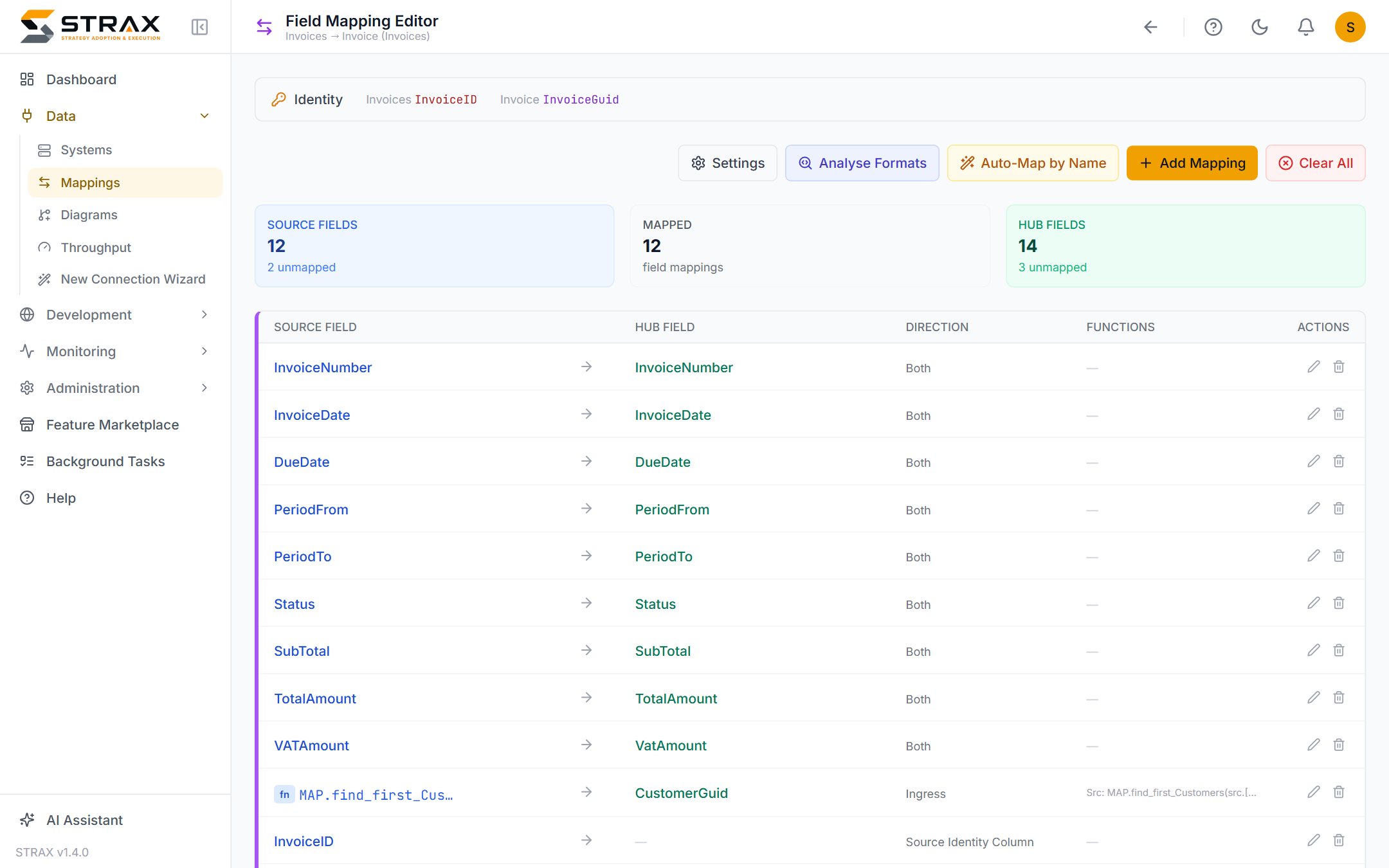
Every mapped field carries a direction, and the direction expresses ownership. A field can flow into the hub, out of the hub to the source, or both ways for values either side may legitimately change. When a field flows both ways, the most recent change wins, so the two systems settle on the same value without manual reconciliation.
Direction turns a business decision into configuration. Demo ISP decides that Splynx owns a customer's balance, HubSpot owns their marketing consent, and either system may update their phone number. Those three decisions become three direction settings, and the platform enforces them from then on. Deciding ownership per field, deliberately and up front, is the single habit that most improves an integration.
Transformations where shapes differ
Source systems rarely match the canonical model exactly. Names differ, types differ, and one canonical value is sometimes assembled from several source fields. A mapping can carry a transformation for exactly these cases: combining a first and last name into one field, converting a date held as text, or supplying a default where the source has nothing. Where two fields already agree in name and type, no transformation is needed and none is written.
AI-suggested mappings, reviewed by you
Mapping a large system by hand is tedious, so STRAX proposes the mappings for you. The AI assistant examines both sides and suggests which tables correspond and which fields align, drawing on names, types and the descriptions you have recorded. A well-described system produces noticeably better suggestions, which is one more reason the register rewards a few sentences per system.
Every suggestion arrives as a proposal with an accept and a reject action. Nothing is applied until you accept it. Obvious matches are usually right and take seconds to confirm; ambiguous ones are flagged for a human decision. You can also ask for changes in plain language, and a built-in validation check reviews the finished mapping and reports anything incomplete or inconsistent before data moves.
The result is a mapping that took hours rather than weeks, with every decision still made by a person who understands the business.
After mapping
A completed mapping makes the integration real. From here, data movement keeps the systems in step continuously, and diagrams show every mapping graphically for review and audit. Mappings themselves are created most easily inside the connection wizard described in Connecting systems, and refined afterwards as the estate grows.