


STRAX Reach · Client communications
One hub for every client conversation, on every channel your clients use
Clients message you on WhatsApp, SMS, email, Telegram, Teams and more. Reach brings every one of those conversations into STRAX: one history per client, one console for your team, one interface for your systems.
- One history per client
- One console for your team
- One interface for your systems

How Reach works
Channels in, one conversation out
Each channel is a package you install when you need it. Whatever channel a client picks, the message lands in the same place.
- SMS
- Web chat on your portal
- Microsoft Teams
- And 32 more channels
- Your team One inbox for every channel
- Client record Contacts, linked identities, full history
- Your systems A versioned API and signed webhooks
What Reach Core gives you
Reach Core is the part every install needs. It holds the clients, their conversations and the tools your team and your systems use to answer them.
One history per client
Messages from every channel land in one history per client, whatever channel they choose on a given day.
Verified identities
Link codes tie a chat to a real client record. Each channel runs open, known-only or linked-only.
One team console
Your team sees and replies to every conversation in the Reach console, on the channel the client used.
Open interface and webhooks
Send, read and poll through one application interface, published as a versioned API if you choose; signed webhooks push every event to your apps.
Built for payment and prepaid businesses
Reach grew out of the conversations payment and prepaid companies have with their clients every day.
Payment and top-up confirmations
Confirm payments, top-ups and withdrawals on the channel each client prefers, with the reference on their record.
Collections that clients answer
Reminders and failed-debit notices invite a reply, and the reply reaches your collections team with the full history.
Fraud and security checks
Ask a client to confirm a flagged transaction or a new login, and keep the answer beside the alert.
Merchant and agent support
Merchants, agents and partner staff reach the same support team as your consumer clients, on their own tools.
Statements on request
Linked clients ask for a statement and receive the PDF your own reports produce, in the same chat.
Thirty-seven channels and two helpdesk mirrors, one package each
Install the channels your clients use. Each one registers with Reach Core, arrives disabled and goes live when its credentials are in place. Web chat on your own portal needs no provider at all, and the Zendesk and Freshdesk mirrors let your helpdesk team answer every channel from their tickets. The Reach API package publishes the application interface as one versioned API.

Reach API
Give your systems a clean, documented Reach API with a key per application
View details →
Web Chat
The chat box on your STRAX Sites portal, answered from the same console as every other channel
View details →
Answer clients on the app most of them already open every day
View details →
WhatsApp via Twilio
Keep WhatsApp on the Twilio contract and console you already run
View details →
WhatsApp via 360dialog
Bring a number onboarded with 360dialog straight into Reach
View details →
WhatsApp via Clickatell
Keep the Clickatell account your SMS already runs on and add WhatsApp to it
View details →
WhatsApp via Turn.io
For organisations whose WhatsApp line already lives on Turn
View details →
RCS via Twilio
Branded, verified messages in the phone's own messaging app
View details →
Telegram
A bot your clients can find by name, answered by your team
View details →
Messenger
Turn page messages into client conversations your team can follow
View details →
Reply to direct messages without leaving the console your team uses
View details →
Viber
Serve clients in the markets where Viber is the default chat app
View details →
LINE
For clients in Japan, Thailand and Taiwan who expect support on LINE
View details →
Slack
For business clients and partners who already live in Slack
View details →
Microsoft Teams
Reach corporate clients in the chat tool their company already approved
View details →
Discord
Let community members message your bot privately and get answers from your team
View details →
Mattermost
For partners who run their own chat server
View details →
Rocket.Chat
Answer partners on the Rocket.Chat server they already trust
View details →
Teams channel posts
Keep a team channel informed without building a bot
View details →
Google Chat space posts
Threaded team notices for companies on Google Workspace
View details →
Google Chat
For business clients who live in Google Workspace and prefer a chat to an email thread
View details →
USSD
A dial code menu that works on feature phones, with follow-ups by SMS and every session on file
View details →
SMS
Reach every client with a phone, whether or not they use chat apps
View details →
Africa's Talking SMS
Local shortcodes and sender ids for clients across African markets
View details →
Send through SMTP, Postmark, SendGrid or Mailgun and thread replies back in
View details →
Voice
Call clients with an urgent message when a text is easy to miss
View details →
SMSPortal
A South African SMS gateway, connected to every client record
View details →
BulkSMS
Repliable numbers and a simple REST API from a long-standing gateway
View details →
Infobip
Use the Infobip contract you have for every channel it carries
View details →
Sinch
One Sinch app for SMS, WhatsApp, Viber Business and RCS
View details →
Vonage
SMS, WhatsApp, Viber and RCS through one Vonage account
View details →
Bird
For companies that moved their messaging to Bird's current platform
View details →
Push notifications
Put important messages on the lock screen of your mobile or web app
View details →
PagerDuty
Wake the on-call engineer when a client conversation needs one
View details →
Opsgenie
Route a client-reported problem to the right on-call team
View details →
Splunk On-Call
Put client-reported failures on the on-call timeline
View details →
Push via Firebase
Notify your Android and iOS app users with your own Firebase project and no extra push vendor
View details →
Web Push
Reach the desktop and Android browsers your clients use for your portal, with no push vendor in between
View details →
Zendesk mirror
Every client conversation becomes a Zendesk ticket, and agent replies travel back on the client's own channel
View details →
Freshdesk mirror
Your Freshdesk agents answer WhatsApp, SMS and portal chats without leaving their helpdesk
View details →AI assistant
Switch on AI replies where you want them. The assistant answers routine questions on any channel, uses a different model for unknown and verified clients, and hands the conversation to your team when it should. It is off by default, and your agents stay in control.
Take it to your next meeting
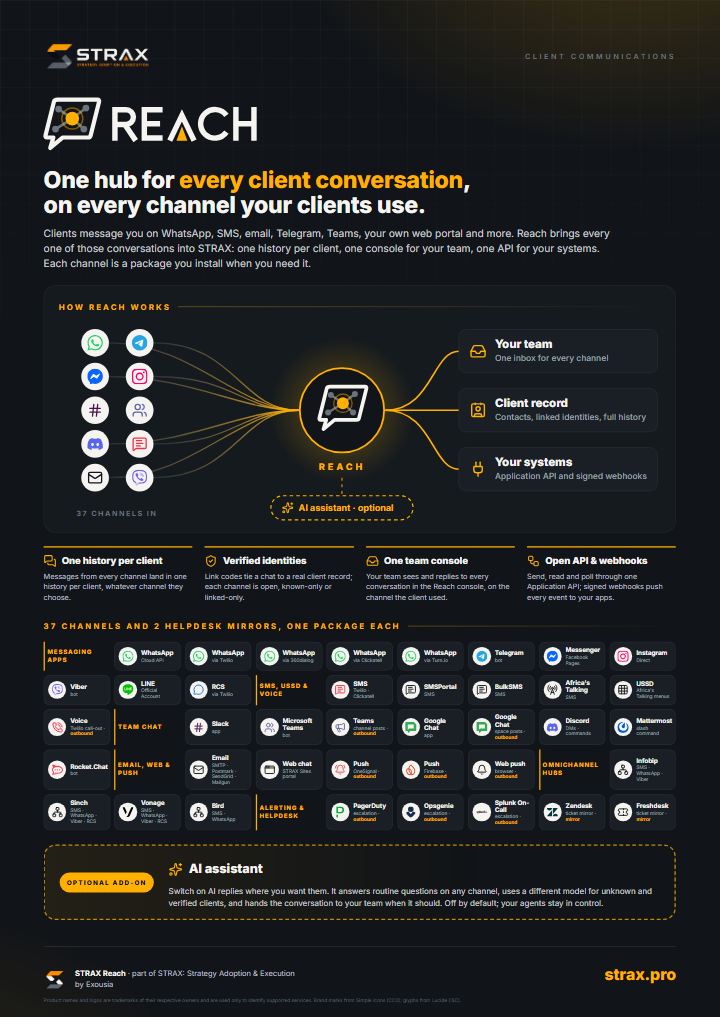
The STRAX Reach poster
How Reach works, the four core capabilities and every supported channel on one page.
Download the PDFQuestions
Do we need every channel?
No package depends on another channel. Start with the two or three your clients already use and add the rest later without changing how your team works.
Where do the conversations live?
In your own STRAX installation, on your servers. Reach stores contacts, identities and messages in your hub database, next to the rest of your company data.
Is the AI assistant required?
It is an optional add-on and ships switched off. Reach works fully with people answering, and you can enable AI replies per contact once you are ready.
How do our own systems use Reach?
Through the application interface: send a message, upsert a contact with their identities, read conversations, poll for new messages and register a webhook for events. With the Reach API package, the same operations become one versioned API with a key per application.
Read more
-
Workflows in STRAX →
Reach runs on STRAX workflows, which you can inspect and extend.
-
Webhooks →
How STRAX receives signed calls from outside services.
-
How the marketplace works →
Installing, reviewing and updating packages.
Plan your Reach rollout
Tell us which channels your clients use today. We set up Reach Core with you and bring the channels live one at a time.
About this listing
| Version | 1.2.1 |
| Author | STRAX |
| Category | Communication |
| Published | 2026-09-24 |
What's inside
| Credential | 2 |
| Data query | 3 |
| Data table | 8 |
| Global variable | 6 |
| Knowledge document | 1 |
| Site | 1 |
| Workflow | 16 |
Premium listing
Buy it from inside STRAX
Reach is a premium bundle. An administrator buys it under Settings → Licence in your STRAX installation, by card or by invoice, and it is unlocked on that installation by itself once payment is confirmed. Prefer a conversation first? Ask us for a quote.
Product names and logos of the supported services are trademarks of their respective owners and are used only to identify those services. Brand marks from Simple Icons (CC0); glyphs from Lucide (ISC).
See it on your own systems.
A demo takes an hour, on your data landscape rather than ours.